 Telic Flow
Know what your AI agents built, and who checked it.
Telic Flow tracks every requirement from the statement of work to production: which agent built it, what evidence backs it, where it is deployed, and the AI and human sign-offs behind every "done".
Free plan, no card needed. Works beside Jira, Linear and GitHub. Connects to Claude Code, Cursor, Antigravity, Codex and Gemini CLI over MCP.
Your tracker says who is working on it. It does not say whether it was delivered.
Agents now write most of the code and close their own tickets. Jira, Linear and GitHub let you assign work to them. What is missing is the record a client, an auditor or your own board will ask for.
"Is everything in the contract built?"
Each requirement is traced to the tasks, commits and tests that delivered it. What is not built is one filter away.
"Is it live, or just merged?"
Every requirement has a status in each environment, with the release that carried it there.
"Did anyone check the AI's work?"
An independent agent verifies it, then a named person signs off. Both are recorded with the evidence they relied on.
"What did the agents cost us?"
Tokens and cost per requirement, by tool and model, with estimated figures clearly marked.
From statement of work to a signed-off "done"
Four steps, and none of them asks anyone to type a status.
Load the scope
Import the statement of work. Each requirement gets a key and acceptance criteria.
Agents build and report
Over MCP or REST they log work and attach commits and test runs as evidence.
A second model checks
An agent on a different model verifies the evidence. The same model is refused.
A named person accepts
An approver signs off per environment. Overrides need a written reason.
One ledger for scope, delivery and sign-off
These are screens from the product, showing its sample project.
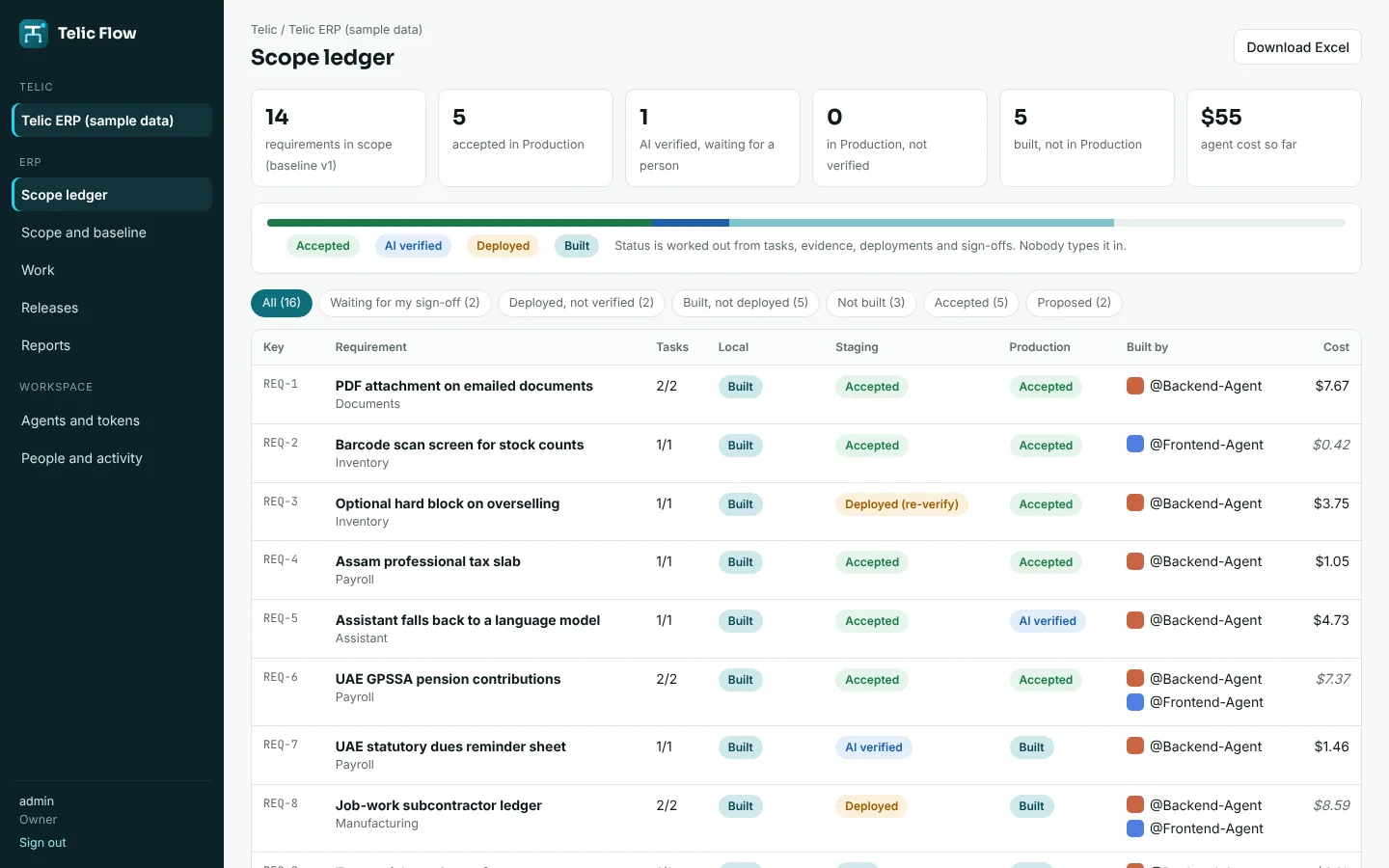
Every requirement, in every environment
Status is never typed in. It is worked out from linked tasks, evidence, deployments and sign-offs, so the ledger cannot drift from what happened.
- Filter to "built, not deployed" or "waiting for my sign-off"
- See which agent built each requirement and what it cost
- A redeploy sends that environment back for re-verification
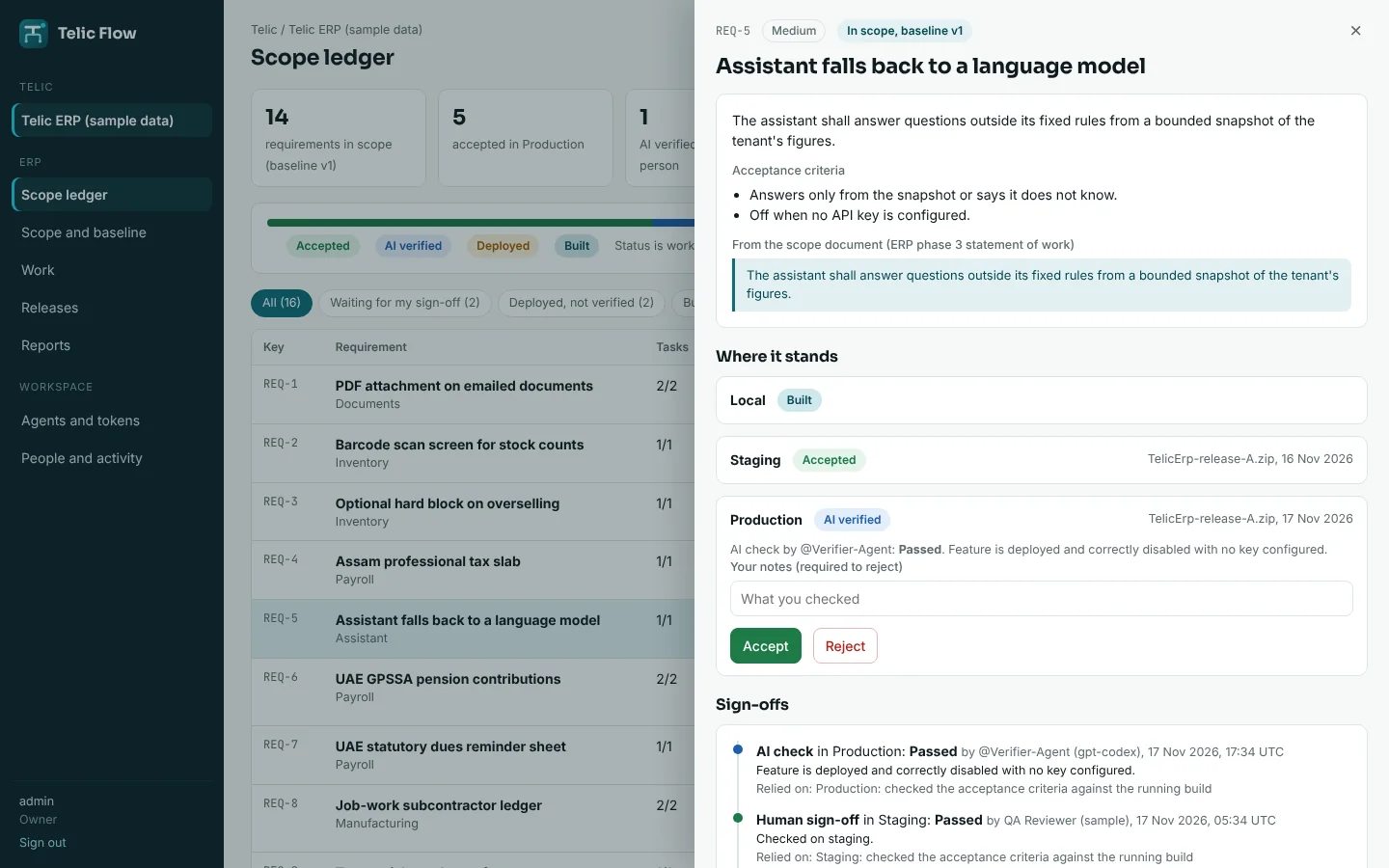
AI verified, then accepted by a person
Open a requirement to see its source in the statement of work, the evidence, and the trail of verdicts. An approver accepts, rejects, or overrides a failed AI check with a recorded reason.
- The builder can never verify its own work
- Human sign-off cannot be given by any agent
- Overrides appear on every report
Keep your tracker. Add the proof.
Telic Flow is not another board to migrate to. Agents and pipelines report to it over MCP or REST while planning stays where it is.
With Jira
Rovo and partner agents take the work items. Flow records whether each requirement was delivered and accepted.
With Linear
Linear delegates issues to agents. Flow keeps the evidence and the sign-off trail behind them.
With GitHub
Agent HQ runs the agents. Flow follows each requirement past the merge to deployed, verified and accepted.
Any agent that speaks MCP can report in
Put one token in the agent's MCP configuration. These are the tools the setup guide covers; others work the same way.
Common questions
What is Telic Flow?
Telic Flow is a delivery record for software built with AI agents. For every requirement it shows what was in scope, which agent built it, the evidence behind it, where it is deployed, and the AI and human sign-offs.
Does it replace Jira, Linear or GitHub?
No. Those tools plan and assign work. Telic Flow sits beside them and answers a different question: was each requirement actually delivered, and who checked. Today agents report to Flow directly over MCP while your tracker stays as it is. Two-way sync with GitHub, Jira and Linear is planned and not built yet.
Which AI agents work with it?
Any agent that can call an MCP server over HTTP, including Claude Code, Cursor, Antigravity, Codex and Gemini CLI. There is also a REST API for CI pipelines and scripts.
How does the AI verification work?
A second agent, registered with the Verifier role, checks the deployed build against the acceptance criteria and submits a verdict with the evidence it relied on. Flow refuses the verdict if that agent built the requirement, or runs on the same model as the agent that did.
Can an agent give the human sign-off?
No. Human sign-off exists only in the console, needs the Approver role, and is recorded under the person's name. There is no API or MCP tool for it.
Look at a finished project first
The console can load four sample projects with failed checks, rollbacks and scope changes, so you can see every report before you add your own.